


An AI app builder can now turn a plain-English description into a working application in minutes. But getting an application to run is no longer the hardest part.
The harder question is what happens next.
Can your team change the application without breaking what already works? Can developers work with the generated code? Can the application follow your design system? Can it connect to existing APIs and enterprise systems? Can it move through your SDLC and CI/CD pipeline? And, perhaps most importantly, can you still understand and control the application six months or five years after it was first generated?
That is why choosing the best AI app builder in 2026 requires looking beyond how quickly a tool produces its first screen.
Some platforms are excellent for prototypes. Others are designed around visual development. Some are essentially AI coding environments. And a smaller group is beginning to approach application generation as an engineering problem, where architecture, design systems, governance, and code ownership are part of the generation process itself.
Recent 2026 comparisons also show how broad the AI app builder category has become, spanning prompt-driven builders, visual platforms, and developer-focused tools.
This guide compares popular AI-assisted application development options, including Bubble, FlutterFlow, Lovable, Replit, Cursor, and WaveMaker, and explains where each fits.
What is an AI app builder?
An AI app builder uses artificial intelligence to automate some or much of the application development process.
Instead of starting with an empty IDE and writing every component, a developer or product team can describe what they want using natural language, provide a design, connect an API, or work with an existing application. The AI then helps generate interfaces, application logic, integrations, code, or other development artifacts.
The exact experience varies considerably between platforms.
A prompt-first tool may generate a complete application from a description. A visual AI app builder may combine AI generation with a drag-and-drop development environment. A developer-oriented platform may use AI to write and modify code inside an existing repository.
That distinction matters because AI app builder is now being used as an umbrella term for several very different approaches to application development.
The best choice depends on what you are actually trying to build.
What should you look for in an AI app builder?
A useful AI app builder should do more than produce an impressive first draft.
For prototypes, speed and ease of use may be enough. For production applications, particularly those developed by enterprise teams, the evaluation needs to go deeper. Here are the capabilities worth looking at.
- AI-assisted development
Start with the obvious question: what can the AI actually build? A capable AI app builder should be able to help with more than generating a few lines of code. Look at whether it can work across UI development, APIs, integrations, business logic, validation, security, navigation, and other application workflows. WaveMaker, for example, uses AI agents for tasks such as API integration, UI validation and event handling, microservices, security configuration, language support, navigation, and state management. - Architecture
This is where the difference between an AI prototype generator and a production-oriented AI app builder becomes clearer. If every prompt can produce a different structure, developers eventually have to spend time normalizing the output. A production application needs patterns that remain consistent as features and teams grow. WaveMaker takes an architecture-first approach, embedding application architecture, components, design tokens, integration variables, and development guardrails into its generation model. - Design systems
Good application development is not only about functionality. Enterprise teams often have established design systems, reusable components, accessibility standards, and brand requirements. An AI app builder should be able to work with those constraints rather than treating every screen as a blank canvas. WaveMaker's design-to-code workflow uses Figma designs, design tokens, and its component library to create application artifacts for web and mobile applications. - Code ownership
Ask what happens to the application after the AI has generated it. Can your developers inspect the code? Can they modify it? Can it live in your Git repository? Can you deploy it independently? For enterprise teams, these questions can be more important than the initial generation experience. WaveMaker generates standard application code that developers can extend, embed, or export, with the generated code owned by the customer team rather than tied to a proprietary runtime. - SDLC and deployment
AI-generated code still has to go through the rest of the software lifecycle. Source control, testing, code review, CI/CD, security checks, deployment environments, and organizational policies do not disappear simply because AI generated the application. The more mature an AI app builder becomes, the more important its ability to fit into these existing workflows becomes. - Maintainability
The first release is only the beginning. A good AI app builder should make it easier to add features, modify existing functionality, change APIs, update designs, and evolve the technology stack without starting over. That is particularly important for enterprise applications, where software may remain in active development for years.
Best AI app builder platforms compared
There is no universal winner across every use case.
A startup validating an idea has very different requirements from a financial services company building a customer portal or an enterprise team modernizing an internal application.
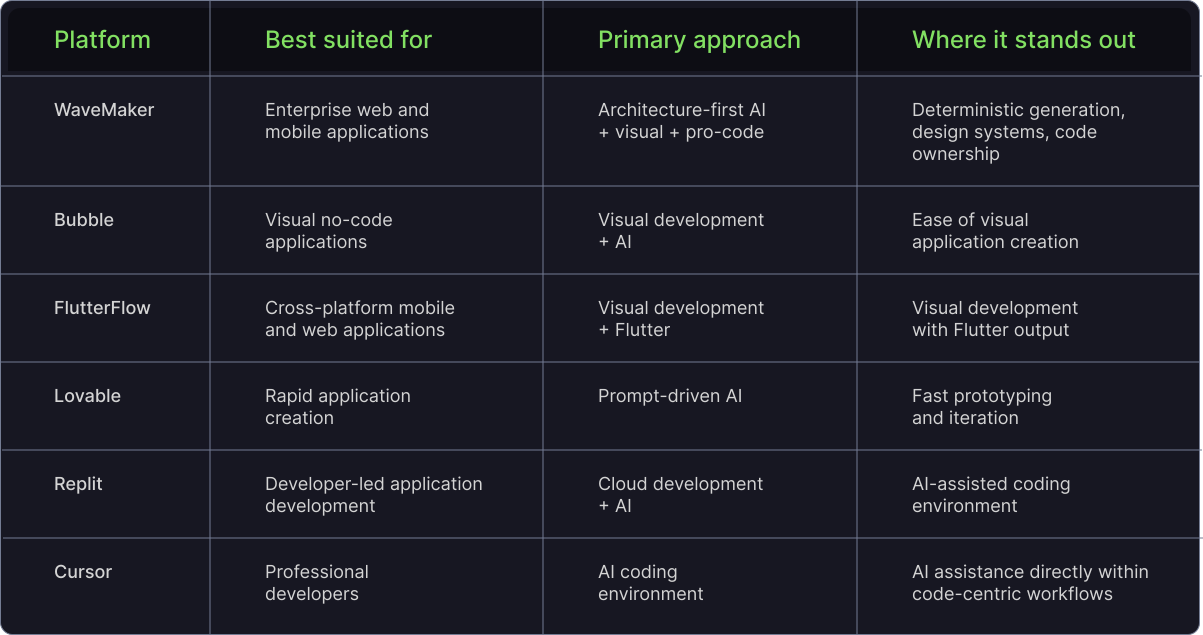
The comparison is useful, but it is equally important to understand that these products don't all belong to exactly the same category. Some are visual application builders. Some are prompt-to-application tools. Others are AI coding environments. The best AI app builder for one team can therefore be a completely different choice for another.
1. WaveMaker: An architecture-first AI app builder for enterprise development
WaveMaker takes a different approach to AI-assisted application development.
Instead of asking an AI model to generate framework-specific production code directly from every prompt, WaveMaker separates application intent from final code through a two-pass development model.
In the first pass, AI agents interpret design or prompt intent and generate a structured, stack-agnostic application representation called WaveMaker Markup Language, or WML.
Developers can then validate and refine that representation through WaveMaker Studio.
In the second pass, WaveMaker's template-based code generators convert the validated markup into application code for technologies including Angular, React, and React Native.
The idea behind this approach is straightforward: AI is useful for interpreting intent. Production software needs predictable implementation.
Why WaveMaker uses a two-pass approach
One of the challenges with purely prompt-driven development is that the same requirement can produce different implementations across iterations.
That can be useful when exploring ideas. It becomes less useful when a team is trying to maintain a large application.
WaveMaker's intermediate representation provides a structured point between AI interpretation and code generation. Its platform material describes the approach as a way to reduce inconsistencies and hallucinations while making application generation more controllable and repeatable.
The result is an AI app builder designed around a solid principle: use AI where interpretation and reasoning add value, and use deterministic generation where consistency matters.
Design-to-code is built into the workflow
Design is another area where WaveMaker takes a different approach.
Its Figma integration can convert designs into structured application artifacts, including design tokens and mapped components. Those artifacts can then be refined within the development environment.
This matters because an application can be technically functional and still feel inconsistent.
Different developers may interpret spacing, components, colors, typography, and interaction patterns differently. A design system gives the team a shared language.
WaveMaker brings that language into the generation process instead of relying entirely on developers to reproduce it through prompts.
Developers remain in control
The goal is not to hide the generated application behind an AI interface.
WaveMaker provides multiple ways to work with an application. Developers can move between agent-based interaction, visual editing, and direct code editing, allowing them to review and refine the generated result.
That human-in-the-loop approach is important for enterprise development.
AI can accelerate implementation, but developers still need to make architectural decisions, validate behavior, and take responsibility for what eventually ships.
The code belongs to the development team
This is another major consideration when evaluating an AI app builder.
WaveMaker generates standard code that development teams can extend, embed, export, and manage through their existing version-control workflows. The platform is built around open standards rather than requiring applications to remain dependent on a proprietary runtime.
That makes the platform particularly relevant for teams that want AI-assisted development without giving up ownership of the resulting software.
Best for: Enterprise web applications, mobile applications, design-heavy applications, modernization projects, and teams that need AI speed without giving up architecture and code ownership.
2. Bubble: A visual AI app builder for no-code development
Bubble approaches application development primarily through visual and no-code development.
Its strength is accessibility. Teams can visually create application interfaces, workflows, data structures, and functionality without building everything through traditional programming.
AI capabilities extend that visual development experience, making it easier to move from an idea toward a working application.
For teams that want to build without assembling a conventional development stack, Bubble can be an attractive option.
The question for an enterprise development team is different, though.
When evaluating any AI app builder, consider how its development model fits your requirements around architecture, source code, deployment, integration, and long-term ownership.
Best for: Visual no-code applications, internal tools, business workflows, and teams prioritizing ease of visual development.
3. FlutterFlow: A visual AI app builder for cross-platform development
FlutterFlow combines visual application development with Flutter.
That makes it particularly interesting for teams that want to build mobile and web applications through a visual workflow while targeting the Flutter ecosystem.
Its appeal comes from the ability to visually assemble interfaces and application behavior while retaining access to generated Flutter code.
As with any AI app builder, the important evaluation questions are less about whether it can generate an application and more about whether the technology, architecture, integrations, and development workflow match your requirements.
Best for: Teams building cross-platform applications where Flutter is the preferred technology.
4. Lovable: An AI app builder focused on speed and iteration
Lovable is representative of the prompt-to-application category. You describe what you want, and AI creates a working application that you can continue refining through natural-language interaction. This makes it particularly useful when the goal is to test an idea quickly.
A product manager can describe a workflow. A designer can explore an interface. A founder can validate an early product concept. A development team can use it to explore an idea before committing to a larger implementation.
That speed is the point.
But it also highlights why the phrase best AI app builder needs context.
A platform that is excellent for creating a prototype is not automatically the best platform for building a five-year enterprise system.
Best for: Prototypes, MVPs, product exploration, and rapid application experimentation.
5. Replit: AI-assisted development in a cloud coding environment
Replit sits closer to the developer side of the market. Rather than being purely a visual AI app builder, it combines a cloud development environment with AI-assisted coding and application creation. That makes it attractive to developers who want AI assistance while remaining relatively close to the underlying code.
The benefit is flexibility. The developer retains responsibility for the application's architecture, dependencies, technology choices, and long-term maintenance. For experienced developers, that can be exactly what they want.
Best for: Developers, technical teams, prototypes, and applications where direct control over the coding environment is important.
6. Cursor: An AI coding tool rather than a traditional AI app builder
Cursor frequently appears in conversations about AI application development, but it is useful to distinguish it from a conventional AI app builder. Cursor is fundamentally an AI-powered coding environment. A developer works with an existing repository and uses AI to generate, modify, explain, refactor, or debug code. That makes it powerful for experienced software engineers who already understand their architecture.
But Cursor does not attempt to replace the architectural role of the development team. The developer still defines the application's structure, technology choices, design patterns, and engineering standards.
This is an important distinction. An AI coding assistant helps a developer build faster. An architecture-first AI app builder attempts to make the development system itself more structured and repeatable.
Best for: Professional developers working with existing codebases and established engineering workflows.
AI app builder vs. AI coding tool: What's the difference?
The terms are increasingly used interchangeably, but they describe different experiences.
AI coding tools
An AI coding tool primarily helps a developer write and modify software. The developer owns the repository and architecture. AI accelerates implementation.
Prompt-to-app platforms
A prompt-to-app AI app builder moves further up the stack.
Instead of asking for individual code changes, the user describes an application or feature and the system generates a much larger portion of the implementation. This can dramatically shorten the path from idea to prototype.
Architecture-first application generation
An architecture-first AI app builder takes another step.
The goal is not simply to generate more code. It is to combine AI generation with application architecture, design systems, reusable components, structured intermediate representations, human validation, and SDLC processes.
That is the model WaveMaker is pursuing. Its platform combines AI agents with a two-pass generation architecture, design-to-code capabilities, an integrated Studio, enterprise integrations, and standard application code.
The distinction becomes particularly important when an application moves beyond experimentation.
Why production applications need more than AI-generated code
AI has become very good at producing working code. That doesn't mean every generated application is ready for production. The problem usually appears later. The first screen looks good. Then the team adds another feature. Then another developer changes the same component. An API changes. The design system evolves. A security requirement appears. The application needs to support another platform. The technology stack needs an upgrade. Suddenly, the quality of the initial generation is no longer the only thing that matters. The system needs to remain coherent.
WaveMaker's enterprise AI development material makes this distinction explicitly: AI-assisted development needs to move beyond individual productivity toward repeatable delivery across teams, with specifications, architecture, context, and guardrails embedded in the development system rather than repeatedly recreated through prompts.
That is the bigger challenge an enterprise AI app builder needs to solve.
The problem with prompt-only development
Prompt-based development is powerful because it is flexible. But flexibility can also introduce variability.
Different prompts can produce different architectural decisions. Different developers can use different instructions. As the application grows, developers may need to provide increasingly large amounts of context to keep the AI aligned with the existing codebase.
The result can be more review, more debugging, and more normalization work. The goal shouldn't be to remove human judgment. It should be to make human judgment more effective by giving the AI system a stronger architectural foundation.
What makes an AI app builder production-ready?
If you're evaluating an AI app builder for an enterprise application, don't judge it only through a polished demo.
Test it with a real application.
- Test the design system
Give the platform an actual Figma design. Look at whether components, tokens, layouts, and interaction patterns survive the journey from design to application. - Test the architecture
Generate more than one feature. Look at whether the resulting application follows the same patterns across modules. - Test the APIs
Connect the platform to the APIs your application actually needs. A simple demo API tells you very little about how the platform will handle real integrations. - Test the generated code
Ask your developers to inspect it. Can they understand it? Extend it? Put it into source control? Run their normal testing and review process? - Test change
This is perhaps the most revealing test. Generate an application, then change the requirements. Add a feature. Modify a screen. Change an API. Update a component. A production-oriented AI app builder should make change manageable rather than forcing the team to repeatedly rebuild the application from scratch. - Test deployment
Finally, determine whether the generated application can enter the organization's existing development and deployment workflow. WaveMaker is designed to integrate with Git, CI/CD, and enterprise deployment environments, with support for cloud and on-premise infrastructure.
Which AI app builder is best for enterprise developers?
There is no universal answer, but the criteria become much clearer for enterprise teams.
If the priority is a quick prototype, a prompt-first AI app builder may be the right choice.
If the priority is accelerating an experienced developer, an AI coding tool may make more sense.
If the team needs to build production applications while maintaining architectural consistency, design governance, code ownership, and SDLC integration, the evaluation changes.
This is where WaveMaker is differentiated.
Its architecture-first model is designed specifically around enterprise development teams building production-grade web and mobile applications. The platform combines AI agents, design systems, structured application markup, deterministic code generation, visual development, direct code access, security configuration, API integration, Git, and CI/CD support.
In other words, the goal is not simply:
Prompt → code
It is closer to:
Intent → structured application model → validation → governed code → deployment
That extra structure is what makes WaveMaker an interesting option for organizations that need AI-assisted development without treating production software like a disposable prototype.
How WaveMaker simplifies app development
WaveMaker brings several development activities into the same workflow. A team can begin with a prompt, a Figma design, a design screenshot or application requirements. AI agents can help interpret the intent and create application artifacts.
The developer can then review the result in Studio, switch between visual and code-based editing, connect APIs, refine the application, and configure the relevant development workflow.
Finally, the platform generates standard application code for supported web and mobile frameworks.
WaveMaker's product material describes this as a path from design systems to production-ready code, with agents handling development tasks while developers retain control over the resulting application.
This approach can reduce the amount of repetitive work developers need to do while keeping the development process recognizable to an engineering team.
The advantages of an architecture-first AI app builder
The biggest advantage isn't simply that AI writes code faster. It is that the AI is given a structure within which to work. For enterprise teams, that can translate into several practical benefits:
- More consistent application architecture
Shared patterns and components reduce the amount of architectural variation introduced during development. - Better design consistency
Design tokens and reusable components help keep applications aligned with the organization's design system. - More developer control
Developers can inspect, modify, validate, and own the generated application rather than treating the output as a black box. - Easier integration with existing workflow
AI-assisted development can sit alongside source control, testing, CI/CD, and deployment rather than creating a completely separate development process. - Multi-platform development
The same application-generation approach can target web and mobile frameworks including Angular, React, and React Native. - Less dependence on repeated prompting
When architecture and guardrails are built into the platform, developers don't have to restate every standard every time they ask AI to implement a feature.
How to choose the best AI app builder for your team
Start with the application, not the tool.
Ask these questions:
- Are you building a prototype or a production system?
For prototypes, speed may dominate the decision. For production applications, maintainability and governance become much more important. - Who will maintain the application?
If developers will own it for years, code ownership and architectural consistency deserve serious attention. - Does the platform work with your design system?
Don't settle for a generic demo. Test your actual design assets. - Can it work with your existing APIs and infrastructure?
Enterprise applications rarely exist in isolation. - Can the generated code enter your SDLC?
Check Git, testing, CI/CD, review, security, and deployment requirements. - What happens when the application changes?
This is the test that separates a compelling demo from a useful development platform.
So, what is the best AI app builder in 2026?
The answer depends on the job.
For visual no-code development, Bubble is a compelling option.
For cross-platform Flutter development, FlutterFlow deserves consideration.
For fast AI-generated prototypes, Lovable is well suited to the job.
For cloud-based AI-assisted development, Replit offers a developer-oriented approach.
For experienced developers who want AI directly inside their coding workflow, Cursor is a strong fit.
For enterprise teams building long-lived production applications, the requirements are different.
They need an AI app builder that can combine AI speed with architecture, design systems, developer control, code ownership, and enterprise development practices.
That is where WaveMaker is designed to fit.
Its two-pass architecture separates AI interpretation from deterministic code generation. Its design-to-code workflow brings Figma and design systems into application development. Its Studio gives developers visual, agentic, and code-based ways to work. And its generated application code can be owned, extended, version-controlled, and deployed by the customer team.
The broader shift is important.
AI-assisted development is moving beyond the question of "How quickly can AI create an application?"
The better question is:
"How quickly can my team create software that remains reliable, maintainable, and under our control?"
For organizations asking that question, an architecture-first AI app builder offers a different path: AI speed without giving up engineering discipline.
Frequently Asked Questions
What is an AI-powered app builder and how does it work?
An AI-powered app builder uses AI to turn application requirements, prompts, designs, or existing context into working application artifacts. Depending on the platform, that can include UI components, application logic, APIs, integrations, and code.
The important difference between platforms is what happens between the initial request and the final application. Some generate code directly from a prompt. WaveMaker takes a two-pass route: AI first translates intent into structured WaveMaker Markup Language, which developers can review and refine before the platform generates application code for frameworks such as Angular, React, and React Native.
What makes the WaveMaker AI app builder unique?
WaveMaker combines AI-assisted development with an architecture-first approach. Instead of treating AI as a layer that simply writes code, the platform builds architecture, components, design tokens, application patterns, and development guardrails into the generation process.
Its two-pass model is central to that approach. AI interprets application intent into a structured intermediate representation, while a template-based generator produces the final application code. Developers can also move between agent mode, visual editing, and code editing during development.
Which AI app builder is best for enterprise developers?
The best option depends on the application and the team's existing development process. Enterprise developers generally need more than fast code generation. They need control over architecture, source code, security, integrations, testing, deployment, and long-term maintenance.
WaveMaker is designed specifically around those requirements. It combines AI agents with design systems, structured application generation, standard web and mobile frameworks, code ownership, Git and CI/CD integration, and developer-controlled workflows.
What features does WaveMaker AI app builder offer?
WaveMaker combines several capabilities in one development environment. These include two-pass AI-assisted application generation, Figma-to-code design automation, an enterprise component and design-token system, AI agents for application development tasks, visual Studio, direct code editing, API integration, security configuration, Git and CI/CD support, and generation for Angular, React, and React Native applications.
It also supports a human-in-the-loop workflow, allowing developers to review and refine generated applications instead of handing complete control to an AI model.
How does WaveMaker AI app builder compare with other options?
The main difference is what the platform is optimizing for.
Prompt-first tools generally focus on getting from an idea to a working application quickly. AI coding environments focus on helping developers write and modify code faster. Visual builders emphasize assembling applications without traditional coding.
WaveMaker is focused on a different requirement: helping enterprise development teams build production applications with AI while maintaining architectural consistency, design governance, code ownership, and control. Its two-pass architecture, design-to-code workflow, standard framework output, and SDLC integration are designed around that goal.


