WaveMaker AI: predictable AI for UI-heavy, enterprise-grade app delivery

AI coding tools are everywhere now - and they are genuinely useful. But if you are responsible for shipping UI-heavy, highly customized, secure apps across multiple teams, you have probably hit the same wall:

WaveMaker AI pairs AI with a standards-driven platform that aligns teams on technology stack, design systems, best practices, reusability, and integration with existing SDLC processes.


What WaveMaker AI optimizes for

WaveMaker is for teams building multi-platform applications where UI complexity is not a side quest- it is the job:

WaveMaker AI advances the platform in three areas designed to accelerate large teams:


Three acceleration pillars in WaveMaker AI


1) Design-to-code automation that starts with your Design System

WaveMaker Autocode converts Figma designs into application artifacts using AI by generating a comprehensive set of design tokens mapped to the WaveMaker UI component library.

AI identifies components in Figma and maps them to corresponding WaveMaker UI components. The WaveMaker UI library has evolved to support complex customization, security, accessibility, and modern UI expectations.

Output targets Angular and React for web, and React Native for mobile.

WaveMaker UI Kit is enterprise-grade and built on Material Design principles. By default, components adhere to Material 3, while design tokens allow teams to adapt the look-and-feel to match their own design system.


Why fidelity and reliability improve: the 2-pass technique

WaveMaker uses a 2-pass generation technique designed to make conversion predictable:

This avoids betting everything on a single one-shot generation. A structured intermediate representation makes the system more controllable, repeatable, and easier to evolve.


2) Developer agents for real app workflows - not just code snippets

WaveMaker AI Agents accelerate workflows while reducing the burden on developers to manage the nuances of underlying UI frameworks, app architecture, or LLM prompting strategies.

Using plain-language prompts, WaveMaker agents help generate capabilities like:


Predictable output comes from structure, not vibes

WaveMaker agents generate predictable results by using the same 2-pass approach:

WaveMaker also provides a flexible agent framework so organizations can create custom agents tailored to their own use cases, standards, and scenarios.


3) WYSIWYG Studio: human-in-the-loop control that scales across teams

WML does not just help AI generate code - it also powers WaveMaker Studio: visual layout creation, drag-and-drop authoring, and fine-grained control over look-and-feel.

This matters when you are using automation heavily. AI is great at proposing; teams still need a fast way to validate visually, course-correct quickly, and collaborate across stakeholders.

WaveMaker Studio supports a large-team environment with integrations across enterprise tooling, including:

It is a full workflow environment - not a bolt-on chat box.


How WaveMaker AI stacks up in an AI dev-tool world

Tools like Cursor, Claude Code, Codex, Replit, Cline, Augment Code, and v0 are pushing the space forward. They are excellent at accelerating individual developers and speeding up prototyping and coding loops.

WaveMaker AI is optimized for a different problem: shipping consistent, design-governed, multi-platform applications across large teams.

Where general-purpose AI coding tools often struggle is where WaveMaker anchors its approach:

If your bottleneck is a single developer coding faster, copilots are great. If your bottleneck is 10 squads shipping coherent UI plus integrations every release, WaveMaker AI is built for that.


The direction forward: AI is not the product - architecture is

In the AI era, prompt-to-code alone does not solve modern application development. Teams need a stronger foundation in architecture that scales, design principles that enforce consistency, open standards-based output, abstractions that reduce skill bottlenecks, and workflows that fit real enterprise SDLC.

WaveMaker AI applies AI where it accelerates, structure where it matters, and control where teams need it.


Is AI generated code ready for enterprise adoption?

Developer productivity, adoption & challenges with AI generated code


WaveMaker AI Generated Code


The growing popularity of vibe coding platforms has led to more LLM usage for code creation, potentially to accelerate app development. The start of 2025 saw a boom in vibe coding platforms, like Loveable, Vercel v0, Bolt, Replit, Kiro, Base44, etc., which simplified developer processes, enabled web app creation, and promised comprehensive app development. However, the quality and consistency of the code generated is highly debated, leading to roadblocks for developer adoption.

The hype!


Anyone can become a programmer

Today, LLMs have evolved to accurately generate programming language syntax, best practices, and well-defined code solutions. Yes, with a well-guided problem statement and appropriate application context, they understand known trends in app architecture and produce meaningful framework code.

Vibe coding platforms produce a lot of code, which is good for bootstrapping an app prototype. But, as you start to iterate and try to make things work, it feels like you are making one step forward and two steps backward (quoted as ‘two steps back pattern’ in the article The 70% problem: Hard truths about AI-assisted coding by Addy Osmani). One needs to be a programmer to review, debug and validate the code generated by these AI code gen tools.

Not all working code is secure and reliable. To validate and accept code suggestions, you need to be a real programmer and that’s the catch!


Complete app development using simple prompts

LLM context window sizes are increasing, evolving to solve large problems and generate considerable portions of apps with layers of complex framework related artifacts, code and dependent libraries. Vibe coding platforms are leveraging these recent LLM improvements to generate entire app scaffolding with business logic to create web apps, based on frameworks like React, Next.js, Node.js, etc.

Vibe coding platforms index and store portions of codebase, so that the vibe coder can express ‘intent’ in plain text (English for now) and the underlying system retrieves and submits these code snippets as context to the LLM for feature generation. This is a very important process and a lot of code and prompt text gets transmitted back and forth between the LLM and the code editor.

Tokens = Syntactical strings ~ (code + prompt text + knowledge base [code examples, tools]) LLMs consume a lot of tokens to generate the code that you desire.

In reality, only simple features gets built with simple prompts and anything complex will need more context and have to go through several iterations. Even after these iterations, chances are high that one needs to end up debugging the code, by askingthe LLM to explain and identify what’s missing!


Super cheap alternative to hiring and building large dev teams

Any complex application development requires a lot of planning, documenting, decisions made regarding architecture, technology stack and developer skillset. LLMs today have matured and are good at automating development tasks such as:

  1. Bootstrapping boiler plate code
  2. Documenting code snippets
  3. Identifying architectural flows
  4. Enforcing coding best practices
  5. Generating well-defined code solutions
  6. Identifying bugs
  7. Generating test cases etc.

However, a team of professionals are needed with in-depth understanding of organization’s needs, domain expertise, ability to understand legacy architectures and appropriate experience to make the right technology and architectural choices. LLMs can only handle automation of certain development tasks only after a strong foundation is laid by experienced developers. Hence, it is not yet viable to build core applications and systems with a bunch of junior developers or non-tech folks assisted by LLMs.

App generation with LLMs today is token frenzy, millions and billions of tokens are needed to build anything practical and it is a very expensive affair at scale! The budgets for large teams are unchecked due to the unpredictable costs and exponential increase as the size of the codebase or the number of developers go up. For a team size of 10-25 developers, monthly AI coding tools alone could cost an additional $75k more per month (as per this article ‘ What a CTO must budget for AI coding tools‘). In reality, both the developer skillset needed and the costs are not dramatically reduced by using AI.


The implications of AI code generation on developer productivity

The unpredictability brought by vibe coding platforms makes it difficult for big organizations and large development teams to adopt AI with the objective of reducing costs or accelerating time to market. However, LLM coding assistance tools like Cursor, Github copilot, Claude Code etc. are well adopted by experienced developers, where they control and govern the output generated by these tools before it is pushed to production.

Coding assistance tools differ from vibe coding platforms in the following aspects, they are:

However, the following are some of the challenges faced by developers who have adopted code assistance tools:

  1. AI hallucinations & non-deterministic output makes developers spend more time debugging
  2. AI generated code is hard to refine through iterations
  3. As the codebase grows, AI makes incomplete suggestions and truncated output
  4. False sense of security and disregard for performance


1. Developers spend more time debugging

One of the challenges with AI is deterministic output and developers are using several mitigation strategies with prompts, context refinement with appropriate code examples, RAG (Retrieval Augmented Generation) based frameworks and guardrails to make the LLM generate consistent output. While some of the development teams who are on a higher maturity curve for AI adoption have figured out these approaches to improve the quality of AI generated code, it is not practical for everyone to adopt and succeed with similar approaches.

A recent report published by harness.io ( Beyond CodeGen: The role of AI in the SDLC), states that 67% of the developers spend more time debugging AI generated code. As this generated code could include outdated dependencies and insecure coding patterns that requires developers to spend more time identifying these problems. While there is initial acceleration, the time it takes to identify and address such problems in AI generated code is a serious setback to developer productivity.


2. Hard to refine AI generated code through iterations

Building a typical code solution in traditional coding approach starts with creating an initial working prototype version and then developers rewrite and refactor this version to adhere to architecture best practices of the organization, security needs, readability and maintainability for upgrades. With AI code generators, developers have a slightly better and faster start, but inevitably they need to iterate with prompts to make it accurate.

AI generates different output in every iterative step making it harder for developers to keep track of changes. Any customizations made previously gets overwritten during iterations, leading to lack of control over code generation. As the feature development progresses and after a few prompt iterations, previously working capabilities could start to fail leading to developer’s frustration and a lot of rework.


3. Inaccurate and incomplete code suggestions

As the size of the codebase increases, the code suggestions are inconsistent for developers to accept. This is largely attributed to limited LLM context window available and developer’s ability to optimize context with approaches leveraging code indexing, other RAG techniques, MCP Servers etc. More compute is needed as the context size increases and LLMs have usage limits and restrictions, resulting in improper output or increased response times.

Today’s LLM architectures, context window and caching techniques are not suitable for large codebases. While MCP (Model Context Protocol) addressed the ability for LLM to retrieve additional context to accurately produce code, it has also increased the complexity around developer tooling.


4. False sense of security and disregard for performance

“A human sees a suspicious URL; an AI sees valid syntax. And that semantic gap becomes a security gap”, by Bruce Schneier - a renowned security expert.


AI Code generation


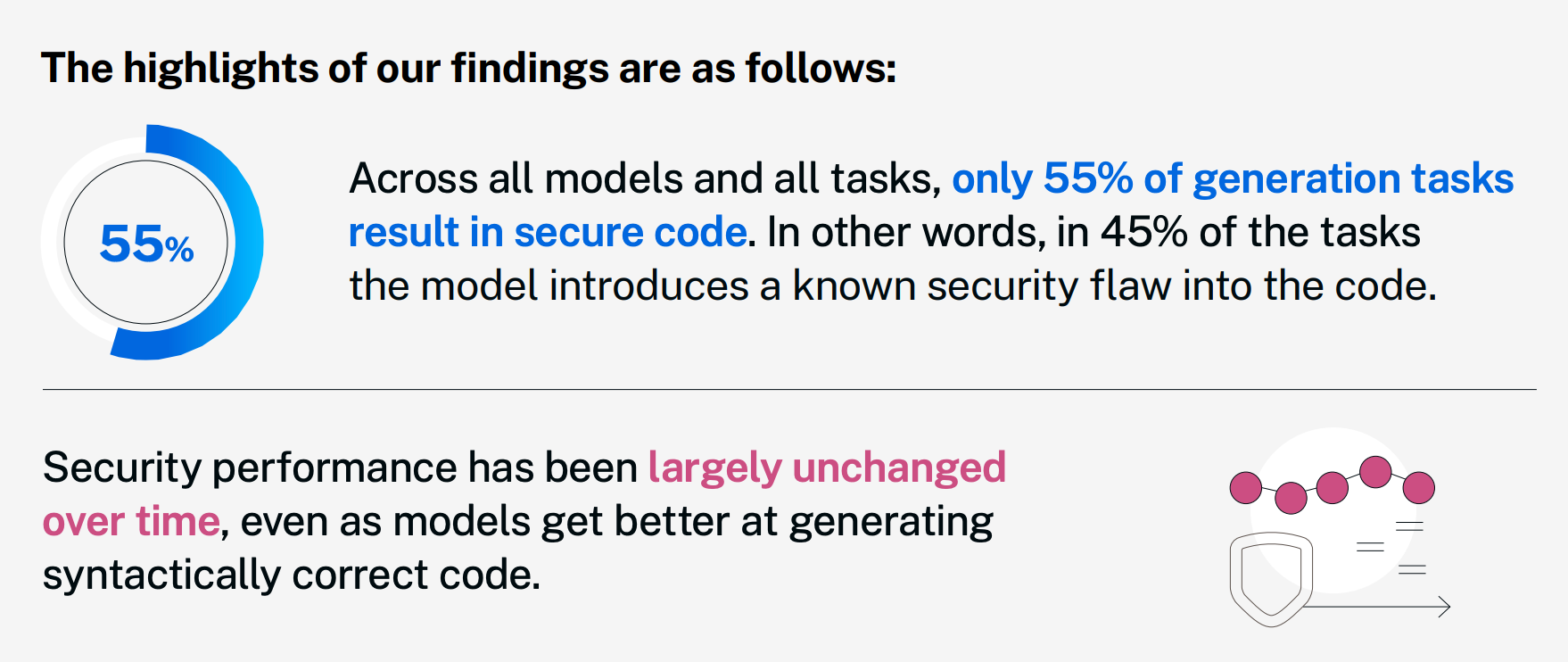
Veracode Gen AI code security report states 45% of the code generated by LLMs have known security flaws, which are identified during vulnerability assessment checks. This is because of the training data on which LLMs are trained i.e. publicly available source repositories and possibly containing vulnerabilities. Another hypothesis is most of the secure implementations and better training examples are not in public repositories and RLHF method for training the models with all possible secure scenarios may not be feasible.

Generating performant code requires deeper understanding and systems-level thinking, which requires a lot more compute. LLMs are as good as their training scenarios and the chances that they are trained on complex use cases and a widespectrum of niche scenarios is unknown. AI report from harness.io hints 52% of the time performance problems are reported in AI generated code.


Conclusion, What’s the road ahead?

AI code gen platforms, AI model providers, tech community and investors are all very bullish about the AI coder dream, but the reality is far from true. While the advancements in LLM technology and the quality of AI generated code is constantly improving over time and becoming adaptable, a human-first approach is needed to build reliable app solutions today.

Developers have to be more cautious with AI generated code and employ more checks and balances in their development environment, such as:

AI code generation platforms need to be more than just glorified prompt wrappers with smart developer interfaces, they need to tackle real challenges in building application solutions in terms of security, reusability, customizability and scalability. These platforms should focus on reducing the skillset needed to work with AI generated code and enable a human-first approach for developers to stay in control and succeed.

The future of app development is going to be very exciting with mature AI code generation solving skill reduction, time to market and building complex use cases. Development teams will be able to lean towards AI coding platforms to solve technology debt, time taken to address security vulnerabilities and building scalable enterprise-grade solutions with more confidence.

Design-First Sizzle Comes to (Boring) Enterprise Applications

The apps we use at work are finally catching up to the ones we love on our phones. Here's why that matters more than you think.

Something odd has been happening inside large enterprises. The same companies that run multibillion-dollar operations on software that looks like it was last updated during the Bush administration are suddenly rolling out internal tools that wouldn’t look out of place on your iPhone. Dashboards with elegant typography. Onboarding f lows with real delight. Partner portals that make you want to bookmark them. The boring enterprise application — that clunky, soul-draining workhorse of corporate life — is getting a makeover. And the makeover is permanent.

This isn’t a coincidence. It’s a convergence. The consumer mobile revolution trained all of us — every employee, every executive, every customer — to expect software that is intuitive, beautiful, and fast. We swipe through Airbnb listings on Sunday and then open a procurement system on Monday that looks like it was designed by a committeein 1998. The cognitive dissonance became unbearable. And now, thanks to a new generation of design tools and AI-powered platforms, the gap is closing at a speed that would have seemed impossible even three years ago.


The Expectation That Changed Everything

Let’s be honest about what happened. The smartphone didn’t just give us a portable computer — it rewired our expectations for every piece of software we touch. Instagram taught us that interfaces should be frictionless. Uber taught us that complexity can be invisible. Notion and Slack proved that tools built for work could feel just as polished as tools built for play.

That shift in expectation didn’t stay in our personal lives. It walked through the office door. Employees started asking uncomfortable questions: why does the app I use to order lunch feel ten years ahead of the one I use to submit a purchase order? Why does our customer portal look like a relic when our competitor’s looks like it was designed yesterday?

Building products for people to use at work shouldn’t be an excuse for bad design. The distinction between designing for consumer and enterprise has rapidly narrowed.

— Amanda Linden, former Head of Design at Asana

These aren’t trivial complaints. They point to a real business problem. When enterprise tools are ugly, confusing, or inconsistent, employees resist them. Training costs balloon. Support tickets pile up. Adoption stalls. And in a world where digital tools are the primary medium through which work happens, that friction is no longer an inconvenience — it’s a competitive liability.


AI Hands the Enterprise a New Starting Point

Here’s where the story gets interesting. For most of enterprise software history, the design phase was an afterthought. Engineers built the functionality. Then, if the budget allowed, someone applied a coat of visual polish. The result was predictable: capable software that nobody enjoyed using.

That sequence has been inverted. Today, AI-powered tools like Lovable let teams describe an application in plain language and receive a fully functional, consumergrade prototype in minutes — not months. The very first thing a stakeholder sees is a beautiful, interactive, working application. Design is no longer the last coat of paint. It’s the first brick.

95% of Fortune 500 companies use Figma

$749M Figma revenue in 2024 (+48% YoY)

13M+ monthly active users on Figma

And then, in November 2025, something happened that crystallized the trend. ServiceNow and Figma announced a strategic integration that lets teams use a Figma design file as a direct prompt to an AI agent that generates a secure, scalable enterprise application. Not a mockup. Not a prototype. A working application — in minutes. Design intent becomes production code without the traditional handoff that used to dilute quality at every stage.

Figma’s CTO captured it perfectly: in a world of AI-generated software, design is the differentiator that will make your product stand out. When anyone can spin up functional code with a prompt, the thing that separates good from forgettable is taste. Craft. The intentionality of the experience.


Design Systems: The Quiet Infrastructure Revolution

Behind the scenes, a less flashy but equally important transformation is underway. Enterprises are investing in design systems — the component libraries, tokens, and style guidelines that ensure consistency across every screen, every product, and every team. This is the plumbing that makes the polish sustainable.

Figma is at the center of this. Two-thirds of its user base are now non-designers — product managers, engineers, marketers — which tells you something profound about where design is headed. It’s no longer a specialized function sequestered in a creative department. It’s an organizational capability. Headspace reports 20 to 50 percent time savings through design tokens. Swiggy cut feature rollout time in half by tracking design system adoption rigorously.

Here’s the crucial insight: design systems don’t just make software look good — they make the entire development process faster and cheaper. They reduce duplicated work across teams, enforce brand consistency without manual policing, and provide the constraint set that AI tools need to generate on-brand interfaces automatically. Design infrastructure is becoming as essential as cloud infrastructure.


Design as the Signal, Not the Garnish

There’s a deeper strategic play here that goes beyond efficiency metrics. Enterprises are discovering that the design quality of their software sends a powerful signal — to employees, customers, suppliers, and partners — about who they are and where they’re headed.

Think about it this way. When a company deploys a beautifully designed internal tool, it tells employees: we value your daily experience. When a customer logs into a partner portal that feels as refined as the best consumer apps, it tells them: we are modern,competent, and invested in this relationship. When a supplier interacts with a procurement platform that is actually pleasant to use, it tells them: we operate at a different level.

Companies undergoing brand transformations or strategic pivots are increasingly leading with design. Not with press releases or ad campaigns — with the actual digital products that stakeholders touch every day. A redesigned enterprise application isn’t just a better tool. It’s a statement of intent.

In a competitive market, polished enterprise tools signal a business values its stakeholders, whether they are customers or partners or employees. Clunky, outdated applications signal stagnation. Design has become an unspoken part of stakeholder branding.


Where This Goes Next

The trajectory is clear. Enterprise applications will continue converging with consumer-grade quality, driven by three forces that are only accelerating.

First, AI will get better at generating interfaces that are not just functional but genuinely thoughtful — pulling from organizational design systems to produce screens that feel crafted, not generated. Second, the tools that bridge design and engineering will keep tightening. The ServiceNow-Figma integration is just the opening act; expect every major enterprise platform to build similar pipelines. Third, the people building enterprise software are changing. When two-thirds of your design platform’s users aren’t designers, the cultural expectation shifts: everyone becomes a stakeholder in experience quality.

$626B projected enterprise app market by 2030

34% faster task completion with design systems

50% rollout time cut at Swiggy via design tracking

The global enterprise application market is projected to nearly double by 2030, growing from $320 billion to $626 billion. Within that expanding arena, the organizations that treat design as a strategic priority — not an aesthetic afterthought — will build software that people choose to use, not software people are compelled to endure.

The boring enterprise application had a good run. For decades, it traded on necessity: employees used it because they had to, not because they wanted to. That era is ending. The tools exist. The expectations are set. The business case is proven. The only question left is whether your organization will lead this shift — or be the one whose software still feels like 2008 while the competition looks like 2028.

Design-first isn’t a trend. It’s the new minimum.


This blog is originally published on Substack